In the UAE, a lot of business starts as a WhatsApp message. “Do you have this?” “Can you send the catalogue?” “What’s the best you can do?” Most of those messages are simple. A few of them are commitments waiting to happen.
A WhatsApp AI agent is useful for the first kind and dangerous for the second. The work is telling them apart, before the agent answers.
I’ve been piloting this at Helper Trade, my own UAE trading and export company, since October 2026. Helper’s WhatsApp Business account is connected to an AI support agent. It answers only simple questions, and only from information I’ve approved in advance. Discounts, prices we haven’t approved, complaints and commercial promises go to me. This article is the design behind it, the rules I’d reuse, and what I’m not claiming yet.
The short version
A WhatsApp AI agent should:
- answer only from approved information, written down in one place
- say “let me check” instead of guessing when the answer isn’t there
- hand the conversation to a named person the moment it touches money, a promise or a complaint
- tell the customer what happens next, without inventing a time it can’t keep
Everything below is how to make those four rules hold up in practice.
Three layers that get mixed up
People say “WhatsApp chatbot”, “WhatsApp automation” and “WhatsApp AI agent” as if they were one thing. They’re three layers, and you should decide each one separately.
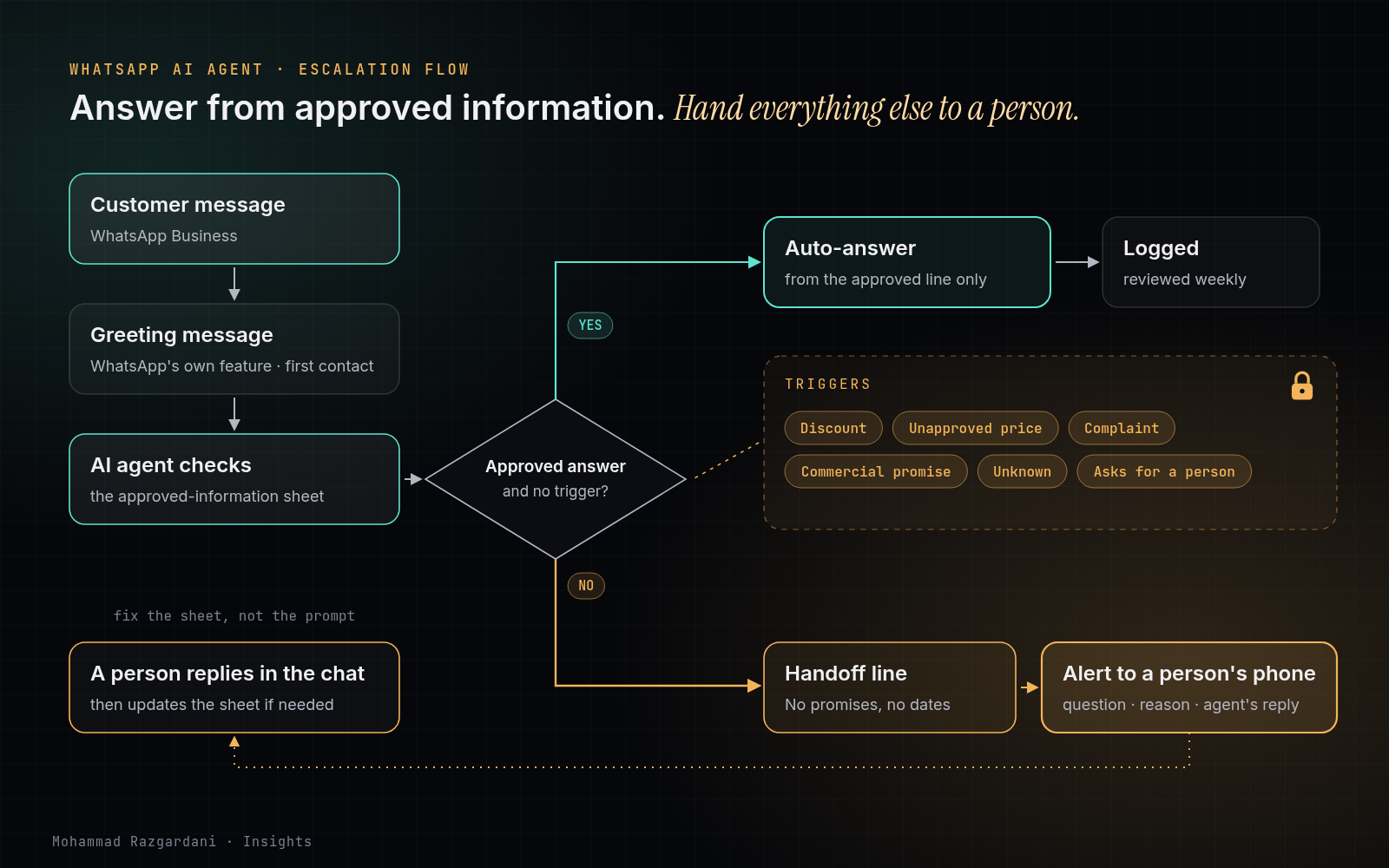
1. The greeting message. This is WhatsApp’s own feature in the Business app. It goes out automatically when a customer messages you for the first time, or after 14 days without activity in that chat (WhatsApp Help Center). It doesn’t understand anything. It just says hello and sets expectations. At Helper, the welcome message is WhatsApp’s own Greeting message. We didn’t rebuild it with AI, because it didn’t need AI. One catch: if you connect Meta’s own Business Agent, the app turns the greeting message off automatically (WhatsApp Help Center).
2. The answering layer. This is where the AI sits. It reads an open-ended question and replies, ideally only from information you’ve approved.
3. The handoff layer. This decides when the AI stops and a person takes over, how that person is alerted, and what the customer is told in between.
Many setups spend all their effort on layer 2. Layer 3 is where the risk is.
Building the agent is now the easy part
Meta announced Meta Business Agent in June 2026: an AI agent inside WhatsApp Business and Meta’s other apps that answers customers using the business’s own information. Meta said it was expanding it to businesses of all sizes globally (Meta). Its developer documentation describes an automatic AI-to-human handoff on signals such as low confidence or a customer asking for a person (Meta for Developers). Third-party platforms on the WhatsApp Business Platform do similar things.
So the hard question is no longer “can we put AI on WhatsApp?” It’s “what is our AI allowed to say, and who picks up when it shouldn’t?” No tool answers that for you.
What we’re piloting at Helper
Here’s the pilot, as of October 2026:
- Channel: Helper’s WhatsApp Business account. The pilot covers WhatsApp only.
- Greeting: WhatsApp’s own Greeting message.
- Answers: the agent replies automatically only to simple questions, using only information I’ve approved in advance.
- Escalation: from WhatsApp, anything involving a discount, a price we haven’t approved, a complaint or a commercial promise is escalated to my personal phone. I answer those myself.
The pilot started in October 2026, and I’m not quoting numbers yet. The aim is clear: simple questions get an answer right away, without me typing them, and the ones that matter still reach me.
The rule that makes it safe: approve the information, not every message
In my article on where the human approval gate goes, the rule is simple: anything that leaves the business needs a person’s approval first. A reply to a customer leaves the business. So how can an agent reply on its own?
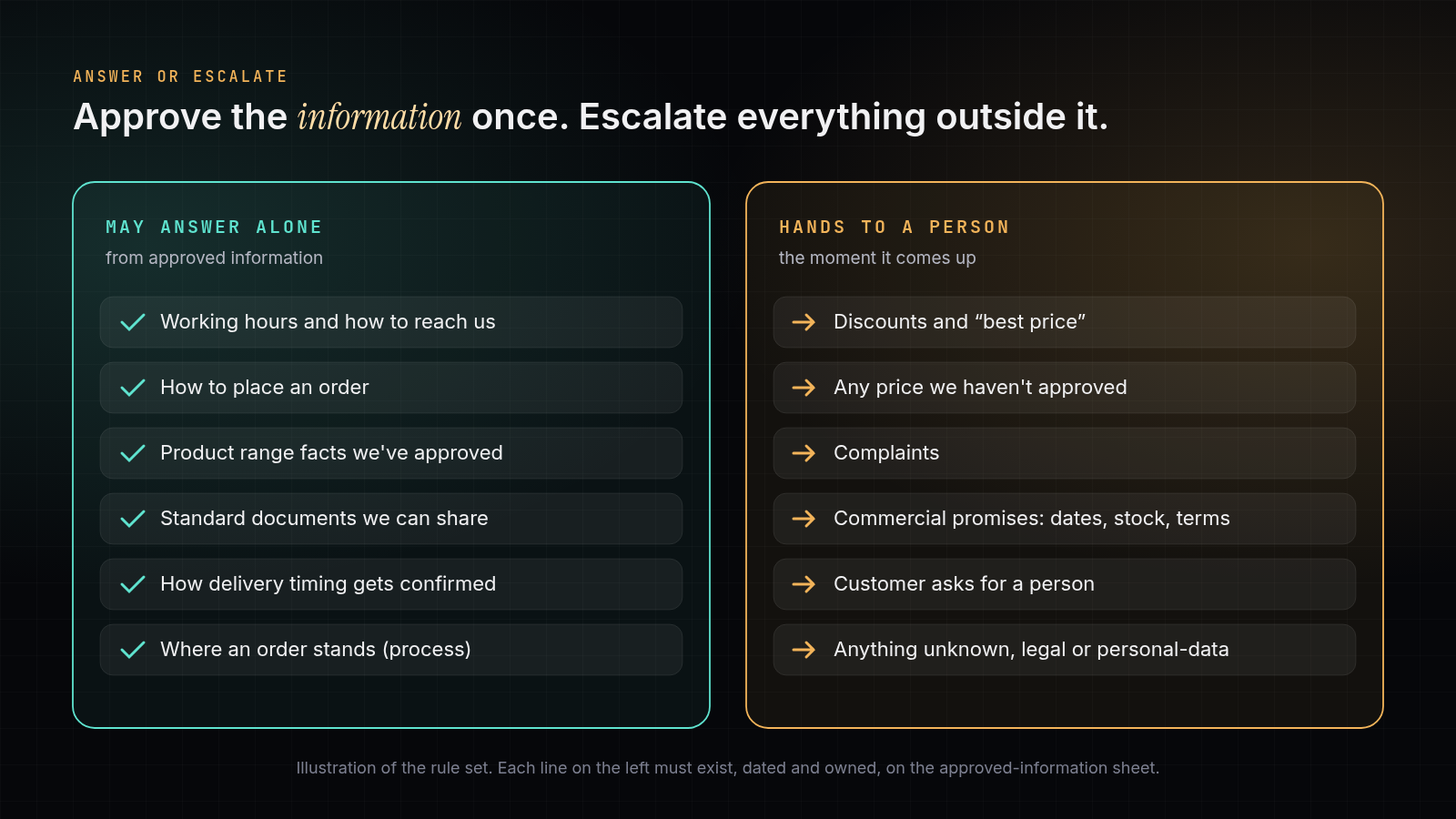
Because the approval moved. Instead of approving each message, you approve the information once, in advance. When the agent answers “What are your working hours?” from a line I’ve approved, the commitment was approved when I approved that line. When a question falls outside the approved lines, the agent is back at the gate, and the conversation comes to a person.
That changes what you build. The most important asset is not the agent. It’s the approved-information sheet.
How to write the approved-information sheet
Keep it in one place, owned by one person, short enough to read in one sitting. For each line, record:
- The topic (for example: how to order, documents we can provide, areas we serve)
- The approved answer, in plain words, ideally in each language you serve
- Who approved it, and when
- Escalate if… the condition that sends this topic to a person anyway
Illustration (not Helper’s actual sheet):
| Topic | Approved answer (summary) | Escalate if… |
|---|---|---|
| How to order | Send the product name and the quantity you need; we confirm availability in writing | The customer asks for a price or a discount |
| Documents | We can share standard product documents on request | They ask for a document we haven’t approved |
| Working hours | Our hours and response times as published | They report an urgent problem |
| Delivery | The general process and who confirms timing | They ask for a delivery date or a guarantee |
Notice what’s missing: prices. Unless a price is formally approved for the agent to quote, the agent doesn’t quote it. “The price for this depends on quantity and terms. I’ll pass this to the team, who’ll reply here” is a perfectly good answer.
Two habits keep the sheet honest:
- Date every line. Information goes stale quietly. A dated line tells you what to re-check.
- Change the sheet, not the prompt. When the agent gets something wrong, fix the approved line. Patching the agent’s instructions over and over hides the real gap.
What the agent must hand over
At Helper, four things always go from WhatsApp to a person:
- Discounts. Any request for a better price, a deal or “best price”.
- Prices we haven’t approved. If the price isn’t in the approved information, the agent doesn’t produce one.
- Complaints. A complaint answered by an agent usually turns into a bigger complaint.
- Commercial promises. Delivery dates, availability, exclusivity, payment terms: anything that sounds like “we will”.
For most businesses I’d add three more:
- The customer asks for a human. Always honour it.
- The agent isn’t sure. “Unknown” is an allowed answer. A confident guess isn’t.
- Anything legal, regulatory or about personal data. These belong to a person, every time.
Designing the handoff
A handoff fails in three common ways: it goes to a shared inbox nobody watches, it arrives without context, or the customer is left in silence. Design against all three.
Send it to a named person, on a device they actually check. At Helper that’s my personal phone, on purpose. It doesn’t scale forever, but the early stage is when I most want to see every sensitive conversation myself.
Make the alert complete enough to act on. A useful escalation alert carries:
- the customer’s question, word for word
- why it was escalated (discount, price, complaint, promise, unknown)
- what the agent has already said
- what the customer is waiting for
Tell the customer what happens next, honestly. “I’ve passed this to the team, and they’ll reply in this chat” is better than a promised time nobody can keep. The agent must not soften the handoff with a commitment, such as “you’ll get a discount”, “it’ll arrive tomorrow” or “don’t worry, we’ll fix it”. That’s exactly the kind of promise you escalated to avoid.
What’s specific to the UAE
A few things matter more here than in many markets:
- Languages. Customers write in English, Arabic, Persian and more, often mixing them. Approve answers in each language you serve, rather than letting the agent translate prices or terms on the fly.
- WhatsApp is the front door, not just support. Many first contacts arrive here, so the first answer shapes the deal. Treat the agent as part of sales, with sales-level care.
- Official channels only. Use the WhatsApp Business app or the Business Platform. Unofficial tools that automate personal accounts or blast messages without opt-in break WhatsApp’s rules and can get the number banned (WhatsApp Messaging Guidelines). WhatsApp’s Business Policy also says that a business using automation must have prompt, clear and direct escalation paths available (WhatsApp Business Policy). The handoff layer isn’t only good practice.
- Say it’s an AI. As general practice, tell customers early that they’re talking to an AI agent and how to reach a person. It sets expectations, and it makes the handoff feel like part of the service rather than a failure.
- Personal data. Conversations carry names, numbers and sometimes documents. Decide where they’re stored and who can see them, in line with UAE data protection law.
Setting it up: a checklist
- List the 20 questions customers ask most. Your chat history already has them.
- Write approved answers for the simple ones, dated and owned.
- Write the escalation list before you switch anything on.
- Pick the person who receives escalations and the device they’ll use.
- Turn on WhatsApp’s Greeting message for first contact.
- Connect the AI to answer only from the approved sheet.
- Write the handoff line the agent uses, with no promises in it.
- Test with ten real-looking messages, including a discount request, a complaint and a question in a second language.
- Start on one channel. If you add others later, connect them to the same approved sheet.
- Review the conversations weekly, and update the sheet, not the prompt.
What I’m not claiming yet
- Still early. The pilot started in October 2026. Early replies are a snapshot, not a result.
- I’m the bottleneck by design. Escalations come to one phone. When volume grows, specific topics will need to move to other named people, not to the agent.
- The sheet will go stale. Approved information has to be maintained, or the agent will confidently repeat yesterday’s facts.
- One channel so far. The pilot is on WhatsApp only. Any channel added later would have to answer from the same approved information, which takes discipline.
Where this fits
If you’re thinking about WhatsApp AI automation, start with the approved-information sheet and the escalation list. They’re short to write, and they make any tool safer. You can follow the Helper AI support pilot as it develops. For trading businesses, a WhatsApp message is also where a CRM record begins, which I cover in my article on CRM for trading companies.
Questions
How do I get an AI agent on WhatsApp Business?
There are two routes. Meta now offers its own Business Agent inside WhatsApp Business, set up from your business information and FAQs. Or you connect the WhatsApp Business Platform to an AI tool of your choice through an official provider. Either way, write the approved-information sheet and the escalation list first; the tool is the easy part.
Is AI available on WhatsApp Business?
Yes. Meta announced Meta Business Agent for WhatsApp in June 2026 and said it was expanding it to businesses of all sizes globally, and many third-party tools connect AI to the WhatsApp Business Platform. Availability of specific features can vary by account and country, so check inside your own account.
Is WhatsApp automation legal in the UAE?
Automating replies through the official WhatsApp Business app or Business Platform is allowed within WhatsApp's own policies. The risk is in unofficial tools that automate personal accounts or send bulk messages without opt-in, which can get a number banned. Handle customer data in line with UAE data protection law.
What's the difference between a WhatsApp chatbot and a WhatsApp AI agent?
A classic chatbot follows a fixed menu or keyword script. An AI agent understands open-ended questions and can take steps, such as looking up information or routing the chat to a person. That extra freedom is why it needs an approved-information sheet and clear escalation rules.
How much does a WhatsApp chatbot cost?
It depends on the route: the WhatsApp Business app's own features, Meta's Business Agent, or a third-party platform on the Business Platform, which may charge per conversation or message plus a subscription. The bigger cost is usually the setup time: writing approved answers and keeping them current.
How do I set up a greeting message on WhatsApp Business?
In the WhatsApp Business app, open Tools, tap Greeting message, turn it on, write the message and choose recipients. It is sent when a customer messages you for the first time, or again after 14 days without activity in that chat.